Bleepster help
Bleepster Protection Status: What Each Message Means
Every status the Bleepster popup can show, from Protected and Muting now to No subtitles here and Live stream, with what each one means and what to do.
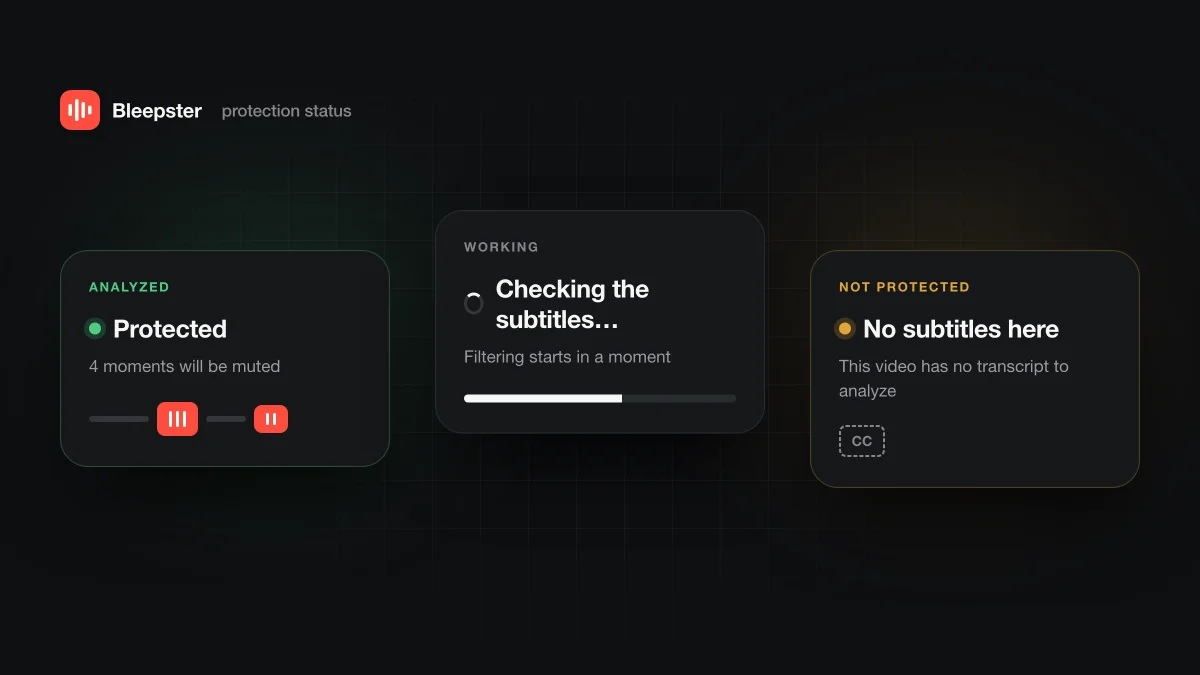
The status card at the top of the Bleepster popup tells you whether the YouTube video in the current tab is protected. Protected, Muting now and Nothing to mute mean analysis finished. Any other message means Bleepster is still working, can't protect this video, or needs something from you.
Which statuses mean the video is protected?
| Status | What the popup says | What it means | What to do |
|---|---|---|---|
| Protected | N moments will be muted | Analysis is done and Bleepster found words to mute. | Nothing. Watch as usual. |
| Muting now | Profanity is being silenced | A flagged word is playing and the audio is muted or bleeped. | Nothing. |
| Nothing to mute | No profanity found in this video | Analysis is done and found nothing to mute. | Nothing. |
Protected doesn't mean perfect. Bleepster mutes what it finds in the captions, at the caption timing, so a wrong or missing caption word can still slip through.
What do the in-progress statuses mean?
| Status | What the popup says | What it means | What to do |
|---|---|---|---|
| Finding subtitles… | Give it a few seconds after the video loads | Bleepster is looking for the video's caption track. | Wait a few seconds. |
| Checking the subtitles… | Filtering starts in a moment | Captions were found and AI analysis is running. | Wait, or turn on Safe start for new videos. |
| Getting ready… | One moment | Bleepster is starting up on this tab. | Wait a moment. |
While these show, words in the part of the video that hasn't been analyzed yet won't be muted. Safe start can pause a new video briefly to cover the opening.
Which statuses mean Bleepster can't protect this video?
| Status | What the popup says | What it means | What to do |
|---|---|---|---|
| No subtitles here | This video has no transcript to analyze | The video has no captions, so there is nothing to analyze. | Pick another video or watch this one yourself first. |
| Live stream | Live streams are not supported yet | The video is live, upcoming or a premiere. | Wait for the recording, or choose another video. |
| Couldn’t check subtitles | Try again in a moment | The AI check failed this time. | Click the status to retry. |
| Subtitle problem | Refresh the tab and try again | The caption track couldn't be read. | Reload the YouTube tab. |
| Paused | Turn Bleepster on with the switch above | Bleepster is switched off. | Turn on the main switch. |
The most common one is No subtitles here. Bleepster works from captions, and some videos have none. Our post on why some YouTube videos have no captions explains the usual reasons.
Which statuses are about your account?
| Status | What the popup says | What it means | What to do |
|---|---|---|---|
| Free limit reached | This video isn't filtered — upgrade for unlimited | All free videos are used, so new videos aren't filtered. | Upgrade, or rewatch videos that already counted. |
| Sign in to continue | Your free videos are tied to your account | Bleepster needs you signed in to analyze new videos. | Sign in with Google or an email code. |
| Device limit reached | This license is already active on 5 devices or Chrome profiles. Open Settings to reset the slots. | Premium is in use on its maximum number of devices or profiles. | Reset devices in Settings (once every 30 days). |
| Offline limit reached | Reconnect to the internet to keep filtering new videos | You've analyzed as many new videos offline as allowed. | Go back online. |
| Reload this YouTube tab | Bleepster was updated — click to reconnect | The extension updated while the tab was open. | Click the status or reload the tab. |
| Open a YouTube video | Bleepster runs only on YouTube video pages | The current tab isn't a YouTube video. | Open a video on youtube.com. |
See how free videos are counted and Premium plans for the limits behind these messages.
What do the toolbar icon colors mean?
The Bleepster icon in Chrome's toolbar turns green while it is muting on that tab. An orange badge with an exclamation mark appears only when the free video limit is reached. Missing captions and live streams don't change the icon, so open the popup to see the full status.
Frequently asked questions
Why does a video say No subtitles here when YouTube shows captions later?
A video that is still processing may not have captions ready yet. Reload the tab later and Bleepster will look for them again.
Does Bleepster work on live streams?
Not while they are live. Once the stream ends and the recording has captions, Bleepster handles it like any other video.
Does an unprotected video use up a free video?
No. Only playback that analysis already covers counts toward the one-minute rule.