Does YouTube Kids Have Swearing? What Each Level Allows
YouTube Kids allows no offensive language at Preschool and some mild language at Younger and Older. See what each level permits and how to make the app stricter.
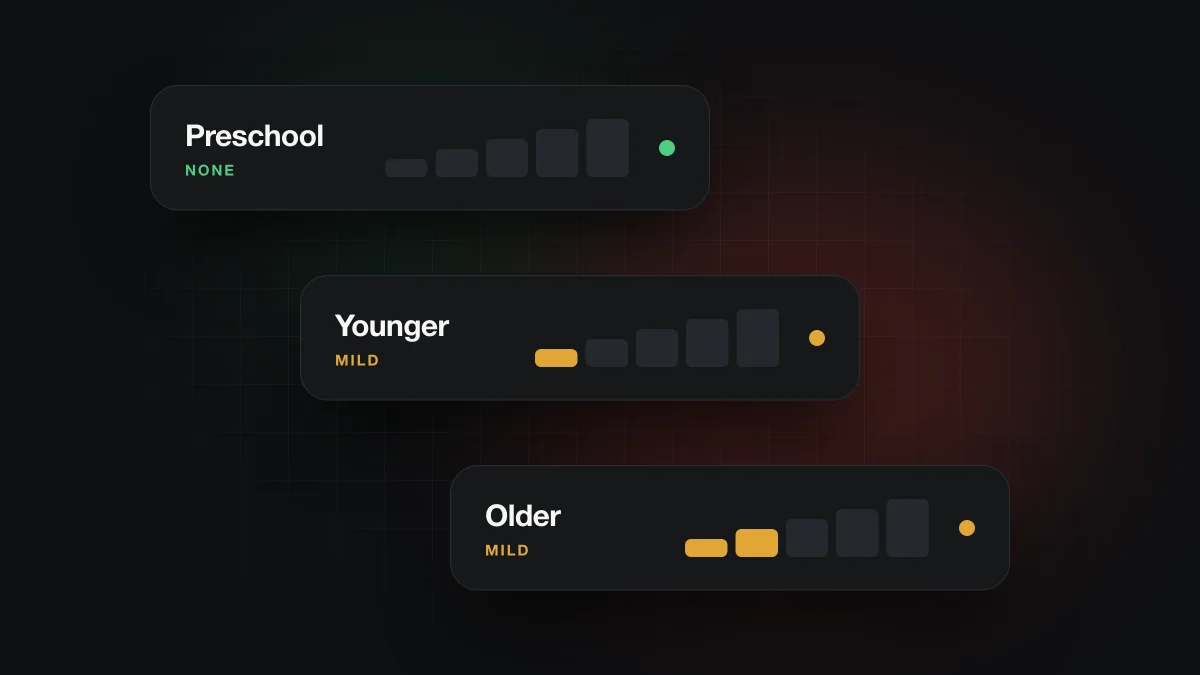
It depends on the content level. YouTube Kids' own policy allows no offensive language or profanity at Preschool, but it permits infrequent mildly offensive language at Younger and infrequent mild profanity at Older. Google also says not every video has been manually reviewed, so some unsuitable language can still get through at any level.
Does YouTube Kids allow any swearing?
At the youngest level, no. At the two older levels, some mild language is allowed by design. That comes straight from Google's YouTube Kids content policy, which describes what each of the app's three content levels is meant to include.
Most articles on this topic stop at "YouTube Kids is safer, but not perfect." The policy is more specific than that. Here is what it says about language for each level, using Google's own short phrases.
| Content level | What the policy says about language | In plain terms |
|---|---|---|
| Preschool | "no use of offensive language or profanity" | Simple, everyday vocabulary. No bad language is allowed at all. |
| Younger | "infrequent use of mildly offensive language" | Occasional mild insults or rude words can appear. |
| Older | "infrequent use of mild profanity" | Occasional mild swear words are within the rules. |
The step from Younger to Older is the one parents tend to miss. "Mildly offensive language" and "mild profanity" aren't the same thing, and Older is the first level where actual swear words, as long as they are mild and infrequent, are allowed. Google doesn't publish a word list, so where "mild" ends is a judgment call made by its systems and reviewers.
How does YouTube Kids decide what's allowed?
YouTube Kids filters whole videos, not words. Google's parent guide for YouTube Kidssays the app uses "a mix of algorithmic filtering, user input, and human review" to decide which videos appear. The homescreen gets extra human review on top of that.
Google is open about the limits. The content policy says that "not all videos have been manually reviewed", and the parent guide says that "no algorithm is perfect", warning that your child may find content you wouldn't want them to see. In other words, the levels describe what YouTube aims for, not a promise that every video matches.
Why do parents still hear bad words in YouTube Kids?
There are two separate reasons, and it helps to tell them apart.
The policy allows some of it
If your child's profile is set to Younger or Older, mild language is permitted by the rules above. Hearing a rude word in an Older video isn't a failure of the filter. It's what that level allows. If your household standard is stricter than "infrequent mild profanity", the level is the first thing to change.
Filters make mistakes
The second reason is that automated filtering misses things, which Google itself acknowledges. This isn't new. In May 2015, a few months after the app launched, the Center for Digital Democracy and the Campaign for a Commercial-Free Childhood filed a complaint with the FTC saying the app showed children videos with profanity and other adult material. TechCrunch noted at the time that search could lead kids to videos outside the app's curated sections. The app and its controls have changed a lot since then, but the underlying problem, that an automated system has to judge millions of videos, hasn't gone away.
How do you make YouTube Kids stricter about language?
You can tighten the app in a few steps, roughly from the biggest effect to the smallest. Google describes each of these in its YouTube Kids parent guide.
- Choose the Preschool level. It is the only level whose policy rules out offensive language and profanity entirely. It also narrows the catalog, so it may feel too young for an older child.
- Switch to Approved content only.Your child then sees only the videos, channels or collections you have picked yourself. This is the strictest option because it doesn't rely on the filter at all.
- Turn off Search. Without search, your child stays within what the app recommends for their level instead of looking up anything they like. Google lists search on or off among the Family Link YouTube controls as well.
- Block or report anything that slips through.The content policy says parents can "block it or report it for fast review". Blocking removes the video or channel for your child; reporting asks YouTube to look at it.
How does YouTube Kids compare with a supervised YouTube account?
A supervised account on regular YouTube uses different levels with similar-sounding names, so it's easy to mix them up. According to Google's supervised experience settings, the Older kids setting allows infrequent mildly offensive language, which is close to the YouTube Kids Younger level. The Teens setting allows frequent offensive language and profanity. Older teens covers almost everything on YouTube apart from 18+ videos. Google adds that its automated systems "aren't perfect and will make mistakes" there too. Which route fits your family is a bigger question, and our guide to YouTube Kids vs a supervised account walks through it.
What if your child watches regular YouTube on a computer?
Then YouTube Kids' rules don't apply, and you need different tools. Many children move to regular youtube.com on a laptop for school videos, tutorials or gaming channels long before they give up the Kids app. Restricted Mode and supervised content levels decide which videos show up there. Our explainer on whether Restricted Mode filters swearing covers what it does and doesn't catch. None of these settings can remove a single word from a video that is allowed to play.
Bleepster works at that word level. It is an independent Chrome extension for desktop Chrome, not made by or affiliated with YouTube or Google. It reads a video's captions, uses included AI to find strong profanity in the caption text, and mutes or bleeps those moments in the tab while the video plays. The video's audio is never uploaded.
To be clear about the limits: Bleepster does not work in the YouTube Kids app or on the YouTube Kids website, and it doesn't run in the YouTube phone, tablet or TV apps. It only applies when your child watches regular youtube.com in Chrome on a desktop or laptop. It needs a caption track, so videos without captions can't be protected, and wrong or late captions can lead to missed or mistimed mutes. It doesn't block videos, hide comments or filter visuals. A Parent PIN can lock its settings, and the first 10 newly analyzed videos are free. Our page on a YouTube profanity filter for families explains the home setup, and the family YouTube viewing checklist pulls the settings together. Short videos and comment sections raise their own questions, covered in whether YouTube Shorts are safe for kids and how YouTube comments work for kids.
Frequently asked questions
Does the Preschool setting allow any bad language?
No. YouTube Kids' content policy describes Preschool videos as using simple language with no offensive language or profanity. Because not every video is reviewed by a person, a mistake can still slip through, which you can block or report.
Can I report a YouTube Kids video with swearing?
Yes. Google says parents can block a video or report it for fast review. Blocking hides it from your child right away, while a report asks YouTube to review whether it belongs in the app.
Does YouTube Kids mute or bleep swear words?
No source from Google says it does. YouTube Kids decides which videos appear at each content level, and a video that is allowed plays as uploaded.
Is YouTube Kids safer than Restricted Mode for language?
They work differently. YouTube Kids is a separate app with its own catalog and a Preschool level that rules out bad language, while Restricted Mode hides some videos on regular YouTube. Both filter whole videos and both can make mistakes.
Does Bleepster work in the YouTube Kids app?
No. Bleepster is a Chrome extension that only runs on regular youtube.com in desktop Chrome. It doesn't work in the YouTube Kids app or website, or in YouTube's mobile and TV apps.